Read and Complete

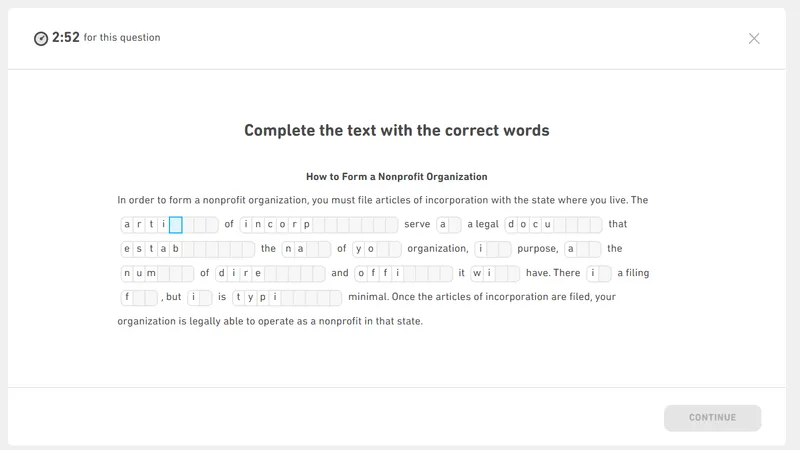
Read a short passage and fill in the missing letters for several unfinished words.

This question tests your reading comprehension and vocabulary in context. You have 3 minutes to read a paragraph where some words are incomplete. You must use the surrounding text to figure out the missing letters for each word.

Test Screen Guide

Click the pulsing orange dots to learn about each part of the screen.

UI Screenshot
+
+
+

How It's Scored

This question directly feeds into two Integrated subscores:

Reading

Evaluates your overall reading proficiency, including your ability to reconstruct incomplete words using contextual and grammatical clues from the passage.

Comprehension

Measures your ability to read carefully and understand the overall meaning of a short academic or general text.

Literacy

Tests your accuracy in reading and spelling words correctly based on surrounding grammar rules.

Question Type Breakdown

The Read and Complete question is a classic "C-Test". It is designed to measure how well you can understand a text deeply and reconstruct missing information using your knowledge of grammar and vocabulary.

Passage Structure

You will see a paragraph describing a specific topic. The very first and last sentences of the text are usually complete. This gives you a safe introduction and conclusion. However, in the middle sentences, several words are "cut in half". The second half of these words will be missing, leaving blank spaces for you to type in.

Grammar and Vocabulary Clues

The missing letters can test different language skills. Sometimes the missing part is a fundamental grammar ending. For example, you might need to add "-ed" for past tense verbs, "-ing" for continuous actions, or "-s" for plural nouns. Other times, the test removes the end of a long vocabulary word (like "technol_ _ _" for "technology"), requiring you to recognize the word from its root and the passage topic.

The "Top-Down" Approach

Because the blanks are part of a larger story, you cannot solve them in isolation. You must use a "top-down" approach. This means understanding the "big picture" (the main topic, the tone, the time period) before focusing on the small details (the missing letters). If the passage is a history text about the 1800s, almost all your verbs will need past tense endings!

Keyboard Controls & Navigation

  • Navigation: Use the Tab key or Arrow keys to move forward safely. If you are on the last letter of a word, pressing Right Arrow or Tab will jump you directly to the next unfinished word. Pressing Left Arrow on the first letter immediately jumps back to the previous word.
  • Correcting Typos: You do not need to delete a wrong letter before changing it! Simply typing a new letter will overwrite the old one immediately. If you need to erase, use Backspace (if the box has a letter, it will delete it; if it is empty, it will move your cursor back one space).
  • Mouse Clicks: You can explicitly use your mouse to click directly into any specific letter box to type or edit out of order.

Managing Your Time

You have 3 full minutes. This is usually plenty of time if you stay calm. Do not rush to click the "CONTINUE" button. If you finish in 2 minutes, use your final 60 seconds to re-read the entire passage again with your inserted words. You will frequently catch spelling errors or grammar mistakes during this final review.

American Spelling is Required

Because the DET is administered by a US-based organization, only American spelling is accepted. If you are accustomed to British spelling, you must be extremely careful. For instance, you must type "flavor" (not "flavour") and "organize" (not "organise"). Using British spelling will be marked as incorrect.

Practice Strategies

  • 1

    Always Read the Full Text First

    Do not start typing immediately at the first blank! Read the entire passage quickly from beginning to end. This helps you understand the topic and tone before you guess any words.

  • 2

    Master Keyboard Navigation

    Use the "Tab" key or Arrow keys to instantly jump between blanks and words. Pressing Tab at the end of a word automatically skips to the next unfinished word.

  • 3

    Overwrite Your Typos

    You never need to delete a wrong letter before fixing it. Simply type the new correct letter, and it will instantly overwrite the old one.

  • 4

    Check Your Grammar Endings

    Does the sentence talk about yesterday? Check if your verbs need "-ed" endings. Are they talking about multiple things? Check for plural "-s" endings.

  • 5

    Skip the Hard Blanks

    If a blank is too difficult, use your mouse to click into a different word or press Tab to move on. Later sentences might give you the clues you need to solve the earlier blanks.

DO

  • Read the entire passage once before answering anything.
  • Use the Tab or Arrow keys to navigate between words quickly.
  • Type over wrong letters directly instead of deleting them first.
  • Always use American English spelling (e.g., 'color', not 'colour').
  • Double-check your spelling and verb tenses before leaving.

DON'T

  • Don't start typing immediately at the first blank.
  • Don't waste time using Backspace if you just want to replace a letter.
  • Don't get stuck—use your mouse or keyboard to skip ahead if you are unsure.
  • Don't click 'CONTINUE' early. Use the extra time to proofread.
  • Don't use British spelling if you are not sure which convention to follow.

FAQs on Read and Complete Question Types

Down Arrow

How many sentences will I need to complete?

Down Arrow

Do I lose points for bad spelling?

Down Arrow

Are the blanks always at the end of the word?

Down Arrow

Can I go back and fix a typo?

Down Arrow

Is it better to guess or leave it blank?